An app that listens to your microphone and tells you "yes, that is an A minor" sounds a bit like magic. In reality, it is Fourier transforms, harmonic templates, and a little temporal memory. Here is how it works, why it is more reliable than it appears, and how to use it to genuinely improve.
What a chord detection app actually does
When you play a guitar chord, several strings vibrate simultaneously. Each string emits a fundamental note plus a cascade of harmonics (integer multiples of the fundamental frequency). Your phone's microphone captures all of this as an audio signal. The app must, in a few milliseconds, transform that raw signal into: "here are the notes I hear", then: "those notes correspond to chord X".
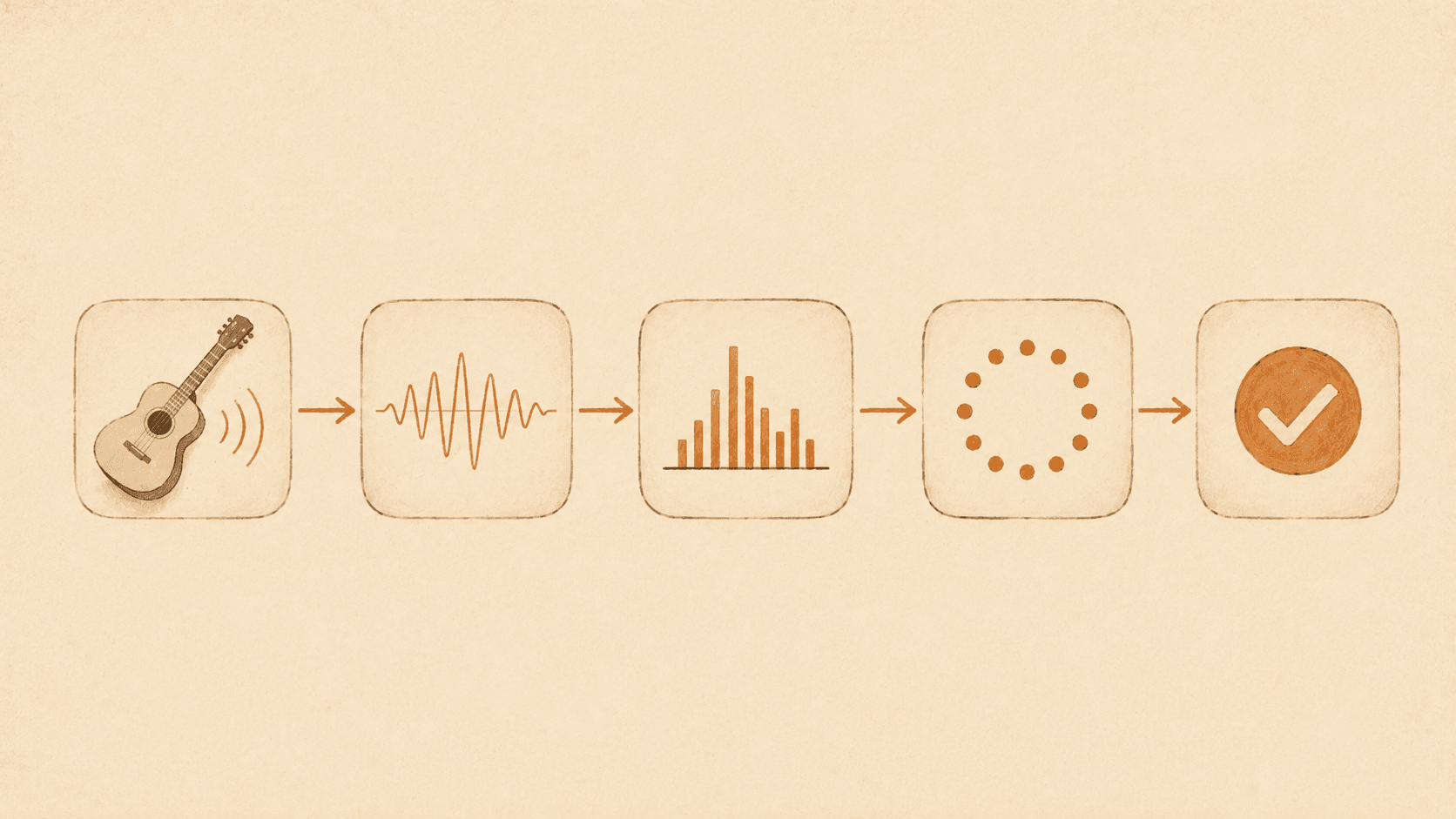
The standard pipeline looks like this:
- Audio capture. The browser supplies a buffer of several thousand samples per second (44,100 or 48,000 Hz depending on the device).
- FFT (Fast Fourier Transform). The time-domain signal is transformed into a frequency-domain signal: for each window of a few tens of milliseconds, we obtain a breakdown of the energy present at each frequency.
- Chroma. Instead of keeping all frequencies (there are thousands), they are grouped into 12 classes: one per note of the chromatic scale (C, C#, D, D#, etc.), regardless of octave. This 12-dimensional vector is called a chroma, and it is the ideal representation for talking about chords.
- Template comparison. The app compares the observed chroma against pre-calculated templates for each chord (the A minor template, the E major template, etc.). The closest match wins.
- Temporal integration. We do not declare "that is an A minor" after a single window, we wait for several consecutive windows to agree on the same result. Otherwise every background noise would produce false positives.
Why it works surprisingly well
Chord templates are very well-defined mathematical objects: a major chord consists of three precise notes (the root, the major third, the perfect fifth), and any harmonic instrument playing it will produce those notes plus their harmonics. The signature in the frequency domain is distinct enough to tell A minor from A major with high confidence, even in ambient noise.
Modern models also incorporate knowledge of harmonics. A guitar does not only produce the fundamental plus the chord notes, it also produces significant energy at octaves, high fifths, and many other predictable positions. A good template incorporates those expected harmonics, making the comparison robust even with a mediocre microphone signal.
Known limitations
Microphone detection is not magic. Here are the cases where it fails:
Very similar extended chords
Cmaj7 and Em share three notes out of four. Distinguishing a true Cmaj7 from an Em with a ringing open string requires a lot of precision in the chroma. An app may confuse them, especially if you play one and accidentally let a string ring that resembles the other.
Background noise
Not noise in general, modern algorithms filter out white noise and stationary sounds well. But another musical source (a neighbour listening to the radio, for instance) introduces its own chroma into the signal and can disrupt recognition.
Out-of-tune guitar
You play an A minor. If your guitar is at 432 Hz instead of 440 Hz, your "A" is halfway between A and G#. The observed chroma is shifted, and the app will struggle. Tune your guitar before testing anything.
Muted strings
If you play a chord where two or three strings come out poorly (accidentally muted or dampened), the app receives a thin signal and may fall back on a simpler chord, or fail detection altogether. In a learning context this is actually a feature: it tells you that you are not playing correctly.
Very fast tempo
If you chain chords every 200 ms, temporal integration has no time to stabilise. Shuffle apps typically allow an evaluation window of 500 ms to 1 second per chord, neither too slow nor too fast.
How to get the most out of microphone detection
Once you know the limits, you can use these apps to genuinely improve. Three concrete use cases:
Self-verification
When you are learning a chord alone, there is nobody to tell you "no, you are muting the B string". The microphone knows: if your chroma is degraded, the app will say "not clear" instead of validating. This forces you to correct what you would never have noticed on your own.
Realistic solo practice
You do not want to ask someone to play the role of teacher during 10 minutes of shuffling. The app does it. The feedback is imperfect (see the limitations), but it is objective, it does not depend on your mood or lucidity at any given moment.
Ear memory tests
Advanced variant: you play a chord without knowing which one (for example, drawn from a random playlist), and you compare your guess to what the app detects. You kill two birds with one stone: you practise the chord and test your auditory recognition.
Choosing between a free app, a premium app, or a live instructor
Honest answer: you need all three at different moments.
A live instructor is irreplaceable for: correcting your posture, spotting tensions in your body that you cannot feel yourself, guiding you towards the right pedagogy for your level, and keeping you motivated long-term. No app will do this as well. If you can afford a lesson once a week or every two weeks, do it.
A microphone detection app is irreplaceable for: practising between lessons, giving you immediate feedback on hundreds of repetitions, managing random chord draws, and keeping you motivated with badges and streaks. It is your daily companion, not your teacher.
A free tuner + chord diagram app is useful for complete beginners who do not want to commit to a learning path yet. But once you are really playing, its limits appear quickly: no feedback, no shuffle, no tracking.
Our approach: Chord Shuffle
We built Chord Shuffle on exactly this logic of microphone detection + shuffle + tracking. No account to create (everything stays on your device), no ads, just the essentials to practise. Select your chords, then start a shuffle. The microphone does the rest.
If you are curious about the technical workings: we use a 4,096-sample FFT, a 12-dimensional chroma, and comparison against analytically generated harmonic templates (not machine learning, we did not need the power of trained models, and they would not have performed as well in a browser). Temporal integration uses a streak system to confirm a chord only after it has been seen across several consecutive windows.